Updating your Base
Learn how to manage and update your target branch and base commit in GitButler.
The target branch is the foundation that your feature branches build upon. Keeping it updated and managing it properly is crucial for a smooth workflow.
Understanding the Target Branch
The target branch is typically your main production branch that acts as the basis for all your local branches.
In practice, this is generally not actually a local branch, it's usually the branch on whatever server you're using to collaborate and merge changes into, so generally it's something like origin/main or origin/master.
When GitButler is first initialized in a project, you are asked to choose a branch to target, as everything in your working directory that doesn't exactly match the tip of this branch is technically a fork of what is considered production. Whatever that target branch looks like when you choose it is set as your 'base'.
You can always check your target branch setting with but config:
GitButler Configuration

User:
    Name: Scott Chacon (global)
   Email: schacon@gmail.com (global)
  Editor: nvim (global)

Target Branch:
    origin/main

Forge:
  • GitHub schacon

UI:
  TUI mode: disabled

Available subcommands:
  but config user    - User settings (name, email, editor)
  but config forge   - Forge settings (GitHub, etc)
  but config target  - Target branch settings
  but config metrics - Metrics settings
  but config ui      - UI preferences (TUI mode)
Or get more information with but config target:
Used to determine common base to calculate commits unique to each branch (not yet integrated)

Target Branch:

  origin/main

  Remote: git@github.com:schacon/why.git
  SHA:    204e309a8298ec047e7d79497a9efcec808ddc95

To change target branch:
  but config target <branch_name>
When you start working, everything that is different from that base goes into a branch based off of it.
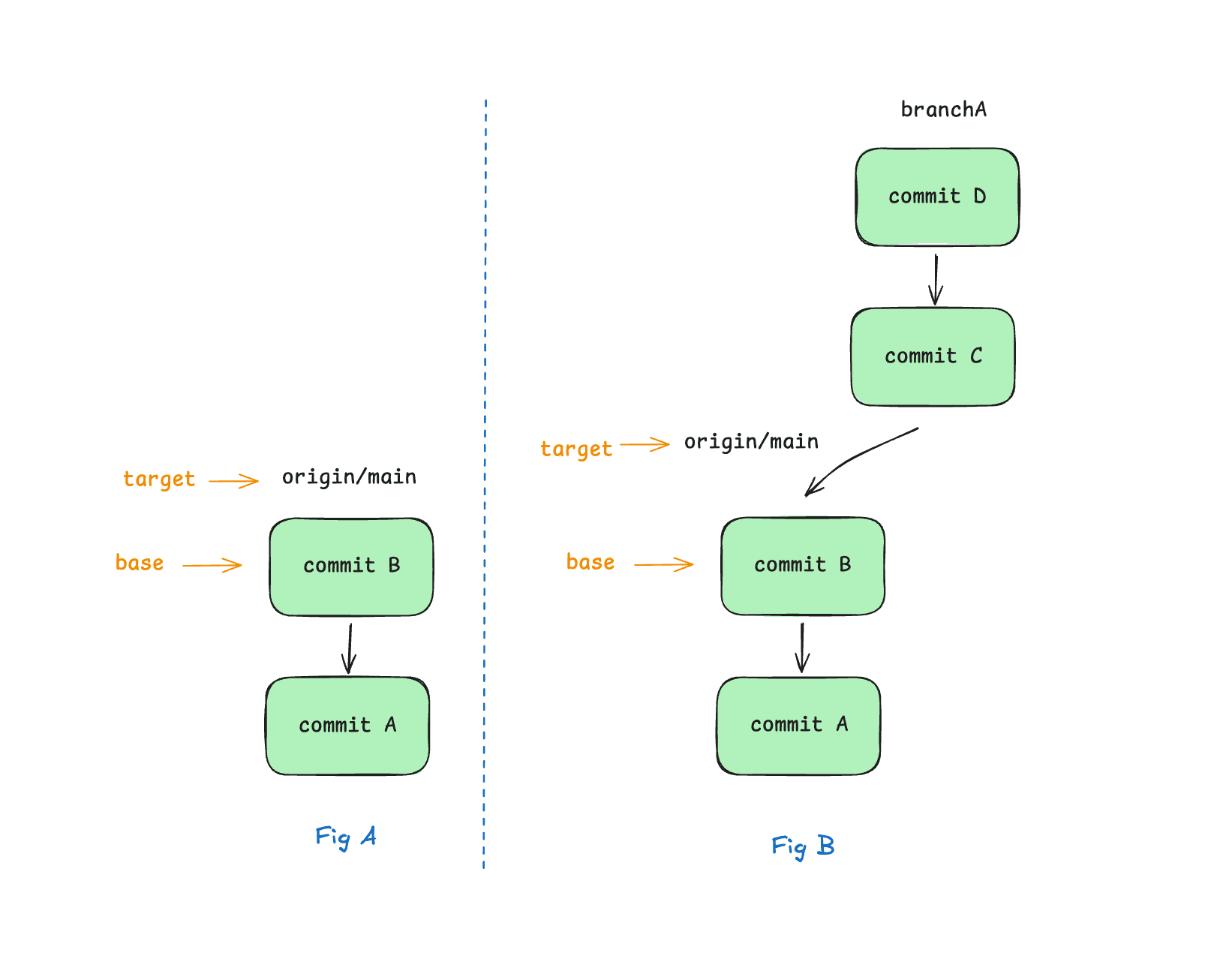
Understanding Upstream
When you first set your target branch (ie, origin/main), we record the state of the branch at that time.
However, if someone else merges work into that branch while you're working, the target branch moves forward, but the work you're doing is still based off of where it was. We call this 'upstream' work, and the commit that the target was pointing at and your branches were based off of is your "base".
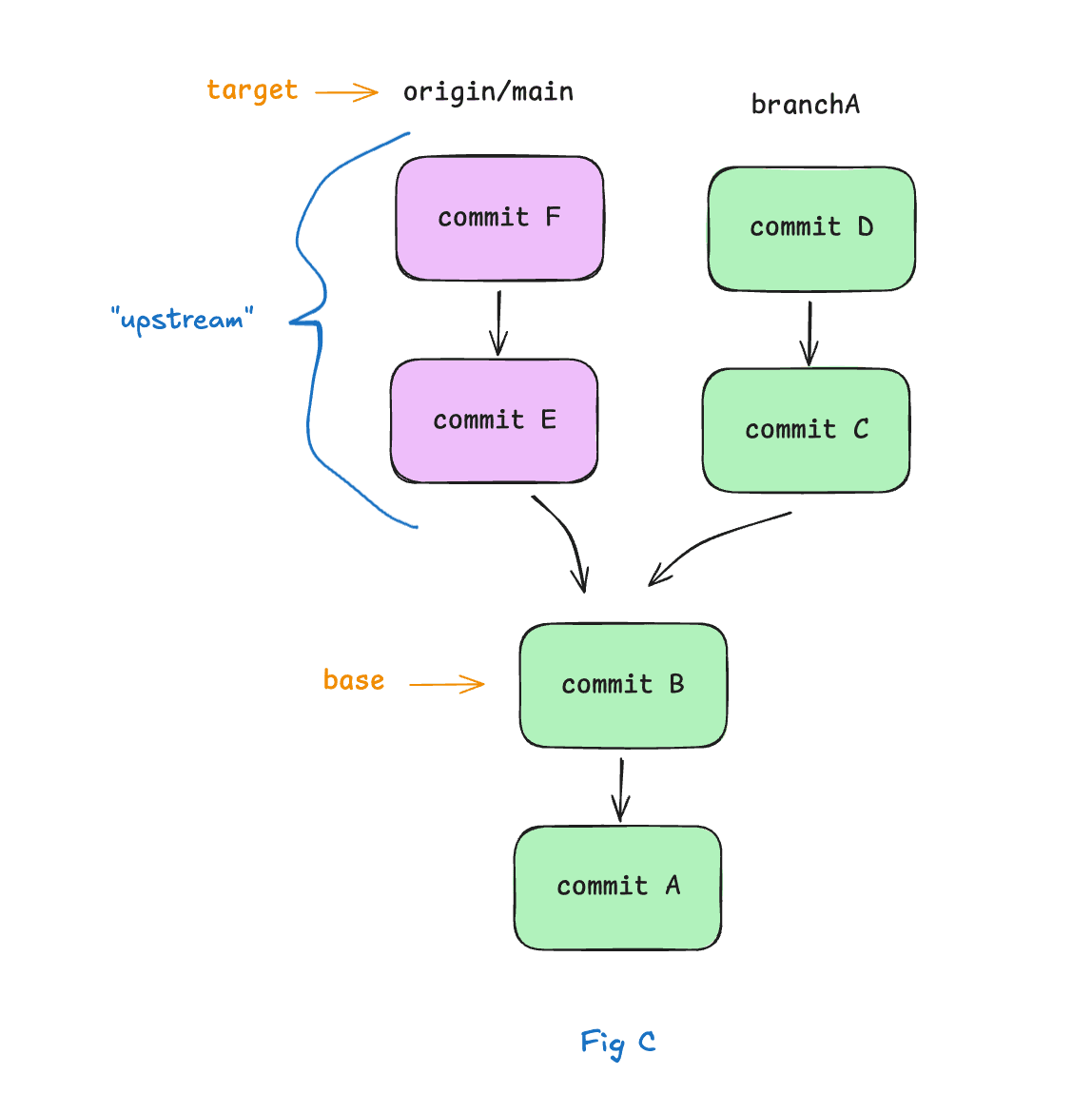
The problem is that now the stuff we're working on is out of date. It may conflict with what is upstream, it may need the work that is upstream, etc. So how do we get our branch up to date?
Viewing Upstream
When you run but status, we will by default show you a summary of upstream work if there is any. You can see a more detailed list of what is upstream by but status --upstream (or -u).
Let's take a look at what this looks like. Let's say that our project is at this state:
╭┄zz [unstaged changes]
┊     no changes
┊
┊╭┄us [user-bookmarks] [✓ upstream merges cleanly]
┊●   464aae4 add user changes
┊●   ca81308 create bookmarks
├╯
┊
┊╭┄(upstream) ⏫ 2 new commits
┊● 32a2175 Merge pull request #65 from schacon/feature-bookmarks  feat: Add bookmar
┊● c6d8414 Merge pull request #57 from schacon/schacon-patch-1  Update README.md
┊┊
├╯ 204e309 (common base) [origin/main] 2025-07-06 Merge pull request #10 from schacon/sc-description

Hint: run `but help` for all commands
We can see that there are two commits upstream (ie, merged into origin/main since we started our branch).
Technically, there could be more reachable commits, but we only show the first parents, so merges of long branches show up as just the merge commits, to simplify things a bit.
Now let's say that we would like to pull in the upstream work and rebase our branches on top of the new upstream to update them. We can check what all would happen with but pull --check.
Base branch:	origin/main
Upstream:	2 new commits on origin/main

  32a2175 Merge pull request #65 from schacon/feature-bookmarks  feat: Add bookmar
  c6d8414 Merge pull request #57 from schacon/schacon-patch-1  Update README.md

Branch Status
  [ok] user-bookmarks

Run `but pull` to update your branches
This will fetch the very latest work, then check that upstream work against your currently applied branches to see if anything has been integrated (and thus we can remove), anything conflicts with upstream work, or a merge/rebase should work cleanly.
In this example, we can see that our user-bookmarks branch would be cleanly rebased if we did a pull, and that there are two things that have been merged since we started our branches.
Updating the Base
When you feel like you want to get your active branches up to date, you can run but pull. This will fetch the very latest work, then rebase your active branches on top of the new target commit to be your new base.
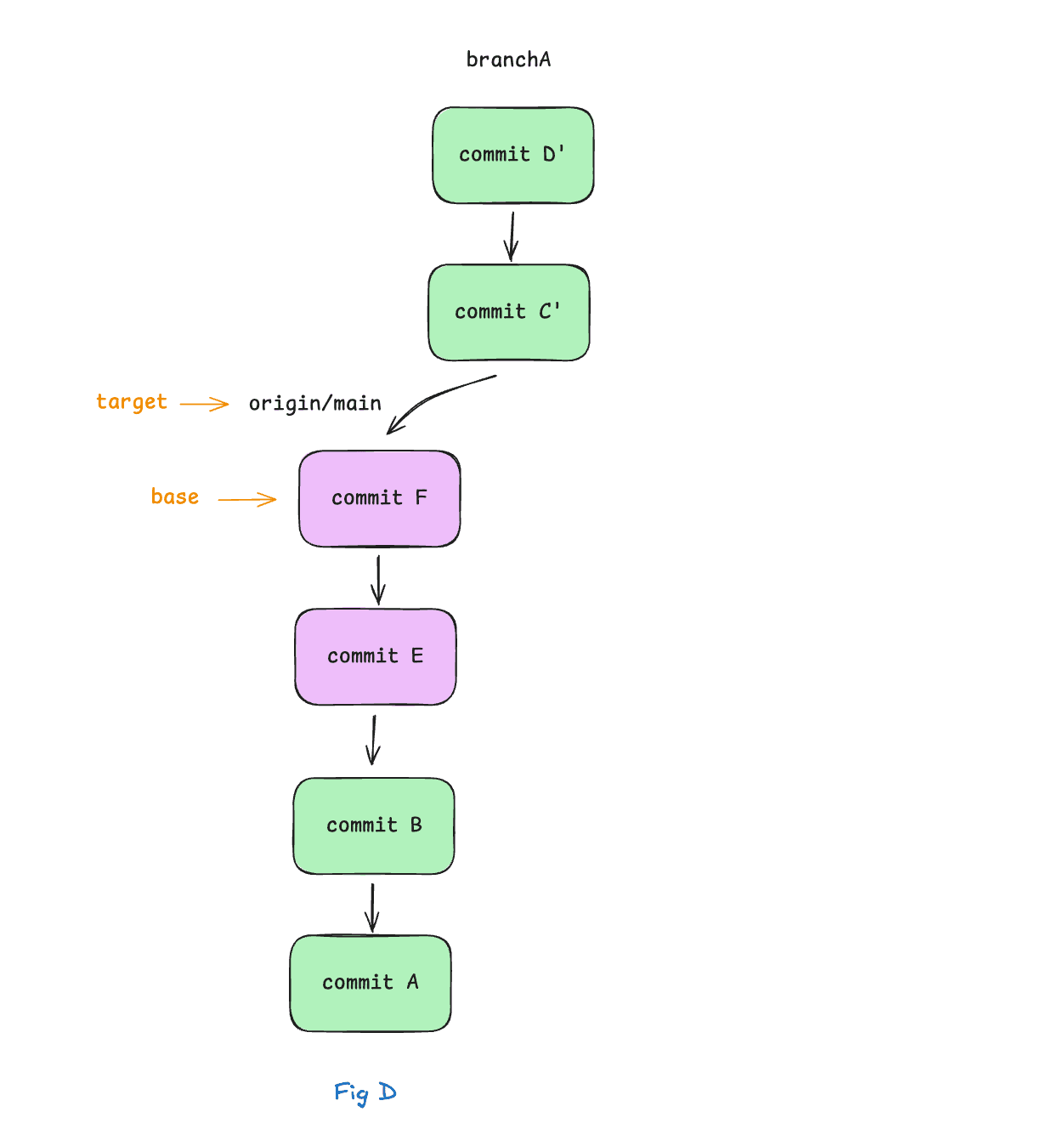
Let's run it in our example.
Found 2 upstream commits on origin/main
   32a2175 Merge pull request #65 from schacon/feature-bookmarks
   c6d8414 Merge pull request #57 from schacon/schacon-patch-1

Updating 1 active branches...

Rebase of user-bookmarks successful

Summary
────────
  user-bookmarks - rebased

To undo this operation:
  Run `but undo`
╭┄zz [unstaged changes]
┊     no changes
┊
┊╭┄us [user-bookmarks]
┊●   b4eeb4c add user changes
┊●   9414216 create bookmarks
├╯
┊
┴ 32a2175 (common base) [origin/main] 2025-11-03 Merge pull request #65 from schacon/feature-bookma

Hint: run `but help` for all commands
OK, now we can see that our integrated branch was removed, our gemfile-fixes branch was successfully rebased and our sc-branch-26 work is marked as conflicted. We'll see how to deal with that state in a minute.
Last updated on